Reducing Nearly All Waste In Immediate Mode UIs
Optimizing immediate mode UI systems for efficiency
A comprehensive exploration of making IMGUI systems nearly as efficient as retained mode UI while maintaining architectural simplicity.
Some of the most common complaints people spew about the immediate mode graphical user interface API style is that:
- 'It's wasteful to recreate your UI every frame, you should be efficient like React (lol) and only do surgical updates when necessary.'
- 'It's wasteful to re-render your UI every frame, retained mode UIs automatically facilitate surgical updates to re-render only those specific widgets which have changed since the last frame.' I did not say the same thing twice here, the first point refers to the logical creation of the UI hierarchy, I believe people refer to this as the 'scene-graph' but I won't be doing that; and the second refers to calling out to the GPU to redraw every pixel to the screen again.
In essence the arguments amount to: while it may provide a simpler API surface, you pay for that simplicity by constantly redoing redundant work, wasting CPU / GPU cycles and power (especially on mobile devices).
Well.... In this article I am going to debunk those myths and show how one can design their immediate mode UI system to do basically no wasteful work, at least not more wasteful work than common retained mode UI systems.
One thing to note before we begin is that all of this explanation will be in terms of an IMGUI system I am writing, my IMGUI is currently specifically for standalone applications (i.e. not for embedding in games, although that will come eventually), therefore it leverages SDL as a platform layer and will thus use some SDL specific APIs for timers, waiting on OS events, etc. If you don't want to / can't use SDL, this can all be done the native OS layer of common user platforms, which is what SDL itself calls into. My IMGUI library is written in the Odin programming language.
By default, in the most naïve implementation of an IMGUI, your core architecture does look like:
for // ever {
	should_quit := app_update()
	if should_quit do app_shutdown()
}
Which is certainly wasteful and will basically peg a core to basically 100% utilization.
A pseudo-code implementation of app_update might look like:
state: App_State
app_state_init(state)

app_update :: proc() {
	collect_os_events(state)
	ui_tree := ui_create(state)
	render_ui(ui_tree)
}
I'm obviously leaving out a tonne of detail, but this birds eye view is fairly accurate.
A less naïve implementation of your high level application loop would do something like:
for // ever {
	start := time.now()
	should_quit := app_update()
	if should_quit do app_shutdown()
	end := time.now()
	sleep_til_next_frame(end - start)
}
This would gain us some reduction in wastage, for example my current UI completes an entire UI update and rendering pass in 1-3ms depending on what's on the screen.
So:
- At 60FPS we could sleep for ~16.666ms - 3ms = 13ms. => ~75% of the frame time is spent sleeping
- At 120FPS we could sleep for ~8.33ms - 3ms = 5ms. => ~60% of the frame time is spent sleeping
- In general, the higher the refresh rate of the monitor, the less time you spend sleeping, the more power used with this approach.
- It should go without saying that the longer your frame takes to complete, the more power used.
While this is some sort of an improvement, waking up this often doesn't do enough to reduce the power usage since OS schedulers will generally place cores into lower and lower levels of sleep as their idle time increases. Lower levels of sleep provide greater levels of power saving.
At this level of analysis, it should be clear to see that good gains can be made by simply
having collect_os_events indicate whether the the operating system (who proxies the
user's input) has any events for the rest of your application to consume.
Giving us something like:
app_update :: proc() {
	start := time.now()
	something_happened := collect_os_events(state)
	if something_happened {
		sleep_til_next_frame(time.now() - start)
		return
	}
	ui_tree := ui_create(state)
	render_ui(ui_tree)
	sleep_til_next_frame(time.now() - start)
}
If the user hasn't interacted with your application, and the application isn't autonomously
animating itself (a case we will cover), then no user input = no work to do. So for many UIs
this has already significantly reduced wasted work down to waking up every x_ms in order to see if there's more work to do. x_ms will vary depending on the refresh
rate, at 60FPS that's ~16ms, at 120FPS it's ~8ms, etc.
We can of course do better than this. The longer a thread sleeps, the deeper level of sleep the OS can place it at, the more power saved.
[! Note from editor: This isn't really true, like it is, but it's the CPU core that goes to deeper levels of sleep I don't think threads have this notion of levels of sleep]
There is no special reason why an immediate mode API cannot facilitate an 'event driven' top level application loop. Meaning, the main GUI thread will sleep until the OS wakes it up with news of user input / some relevant event [! THIS IS BADLY WRITTEN FIX!].
We achieve this by converting the core architecture of our application loop from polling based to waiting based. The top level of the application would now look something like:
app_update :: proc() {
	event: sdl.Event
	// Block here if there's no events on the queue.
	if wait_for_event(&event) {
		ui_tree := ui_create(state)
		render_ui(ui_tree)
	} else {
		app_shutdown()
	}
}
Essentially the call to wait_for_event() will block and the thread will sleep until
an event arrives for it to process.
Now that we have a higher level understanding, let's dive into some real code and real measurements. The code samples are taken from an audio application that's built on top of my own IMGUI library. You can read a little more about it in this post where I discuss optimizing waveform rendering (that post is mostly about waveform rendering, but it has some screenshots of the GUI and more code snippets from the library).
At the time of writing this post, my main application loop is much like the inefficient earlier example, we spin as fast as the CPU can go, poll SDL for events, handle all the events and proceed into UI creation and rendering.
It looks like:
app_update :: proc() -> bool{
	if register_resize() {
		set_shader_vec2(ui_state.quad_shader_program, "screen_res", {app.wx, app.wy})
	}
	event: sdl.Event
	reset_input_state()
	show_context_menu, exit := ui_state.context_menu.active, false

	for sdl.PollEvent(&event) {
		exit, show_context_menu = handle_input(event)
		if exit {
			return false
		}
	}
	// ...
	// <SNIPPED>
	// ...

	root := create_ui()

	rect_render_data := make([dynamic]Rect_Render_Data, context.temp_allocator)
	collect_render_data_from_ui_tree(root, &rect_render_data)
	render_ui(rect_render_data)

	sdl.GL_SwapWindow(app.window)

	reset_ui_state()
	free_all(context.temp_allocator)
	app.ui_state.frame_num += 1

	app.curr_chars_stored = {}
	return true
}
Many of the details of this function aren't relevant to the overall theme of this post; the main thing though, is that I originally setup the main application loop in a naïve and power hungry way.
app_update is called in a loop inside main.odin like so:
run_release :: proc() {
	app.app_init()
	for {
		if !app.app_update() {
			break
		}
	}
	app.app_shutdown()
}
The reason for these app_init(), app_update(), app_shutdown(), being members of an app struct has to do with hot
reloading. My program is split into a lightweight main.exe, and an app.dll. The majority of the functionallity is in app.dll, which
allows me to edit and recompile that DLL and the dev mode build of my program will pickup this
change, unload the old DLL and load the new one, keeping the existing state; though this isn't
relevant for this post since all profiling is done in release mode, and in release mode we
just run app_update() in a loop without checking for any DLL . So here you can
consider run_release() as akin to the main entry point of the application.
So with this setup, the application running, but just sitting idle on a static screen that looks like:
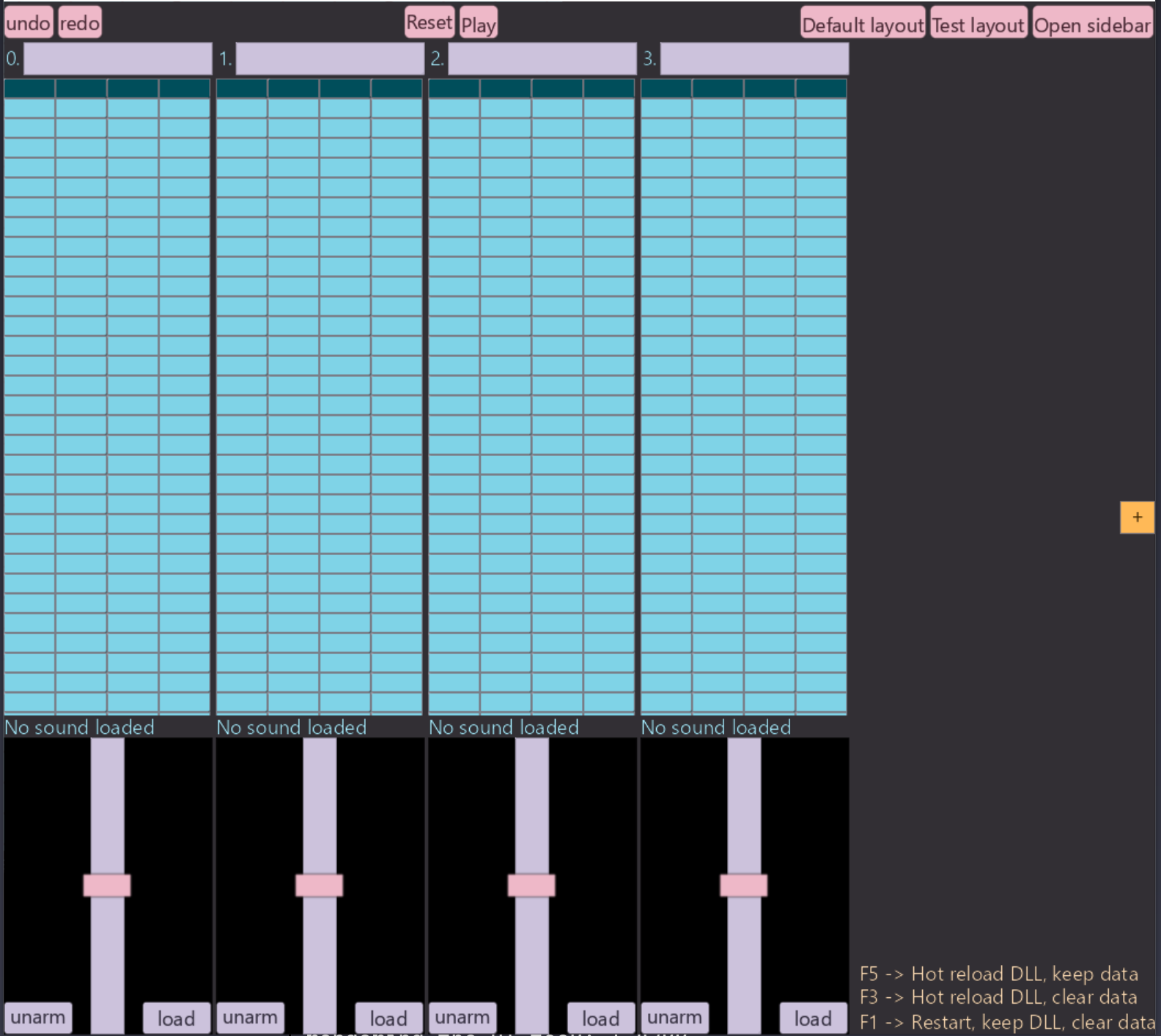
The CPU / power usage as we can see in Windows Task Manager, is concerningly high for such little action:
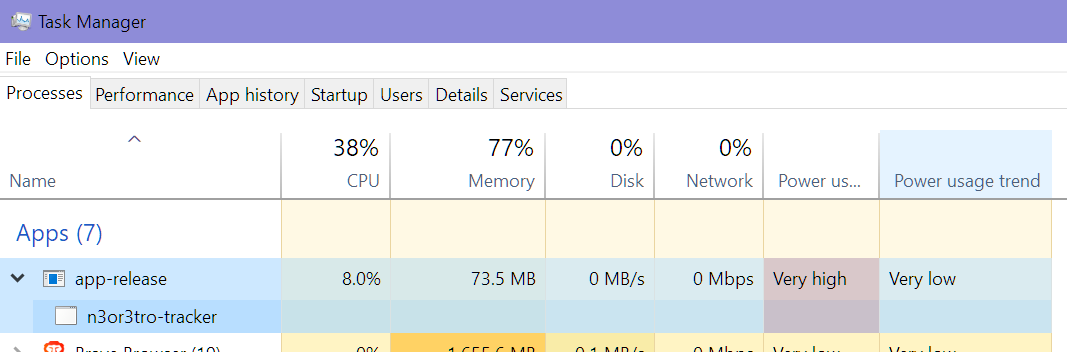
This is on a 14 (20 logical) core Intel 13600kf CPU. So that power usage represents, basically
> an entire core fully saturated. 100/20 = 5 %, not sure why it's greater than this since the
UI runs on 1 thread, there are background threads associated with SDL and miniaudio? but they're relatively inactive. Any who, doesn't really matter,
as we'll soon see, we're headed to 0% CPU usage at idle.
So let's implement that switch I talked about previously: going from polling based to waiting based, the changes we make should cause no noticeable difference in program behaviour, the only thing would be a slight millisecond range delay for the main thread to wakeup and get to work. I assume this is identical to all other waiting based retained mode GUI apps, and in real use for desktop apps it shouldn't be noticeable.
So to make that switch all we need to do is:
app_update :: proc() -> bool{
	// Same as the previous snippet.

	event: sdl.Event
	reset_mouse_state()
	show_context_menu, exit := ui_state.context_menu.active, false

	// Sleep until an event arrives and unblocks us.
	if sdl.WaitEvent(&event) {
		exit, show_context_menu = handle_input(event)
		if exit do return false
	}

	// Poll for any other events that arrived with the after the unblocking event.
	for sdl.PollEvent(&event) {
		exit, show_context_menu = handle_input(event)
		if exit do return false
	}

	root := create_ui()

	// ...
	// Unchanged, literally the exact same code as the previous snippet.
	// ...

	return true
}
With this change implemented, let's see what our CPU usage is looking like:
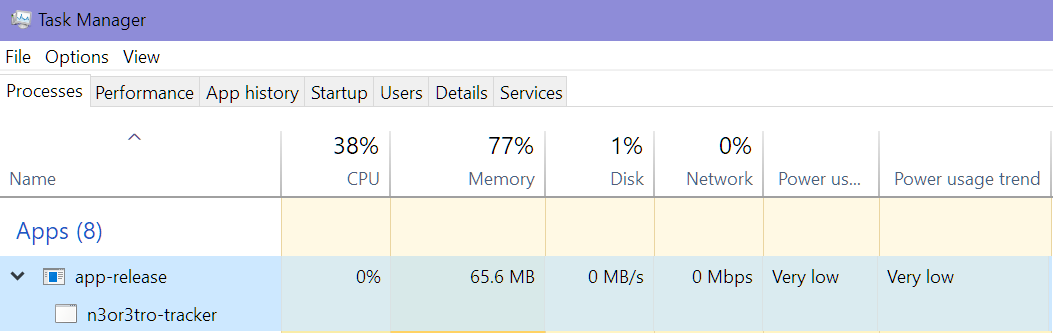
Sweet! We've basically completely eliminated any wasted CPU cycles from running when the user is not interacting with the application! No user interaction => no visual changes triggered => no CPU / GPU time wasted & no power wasted.
But, this has unfortunately introduced an annoying unexpected bug. For one,
animations that relied on just continually updating some piece of data and feeding it into a
widget, like how the play head works, no longer work, but that was expected (we'll talk about
a solution below). The unexpected issue I came across was the incomplete rendering of certain
widgets take > 1 frame to create and render (explained below). In my UI, one such widget is
the File_Browser.
With the current setup, clicking the Open Sidebar button, leaves the UI in this visual
state:
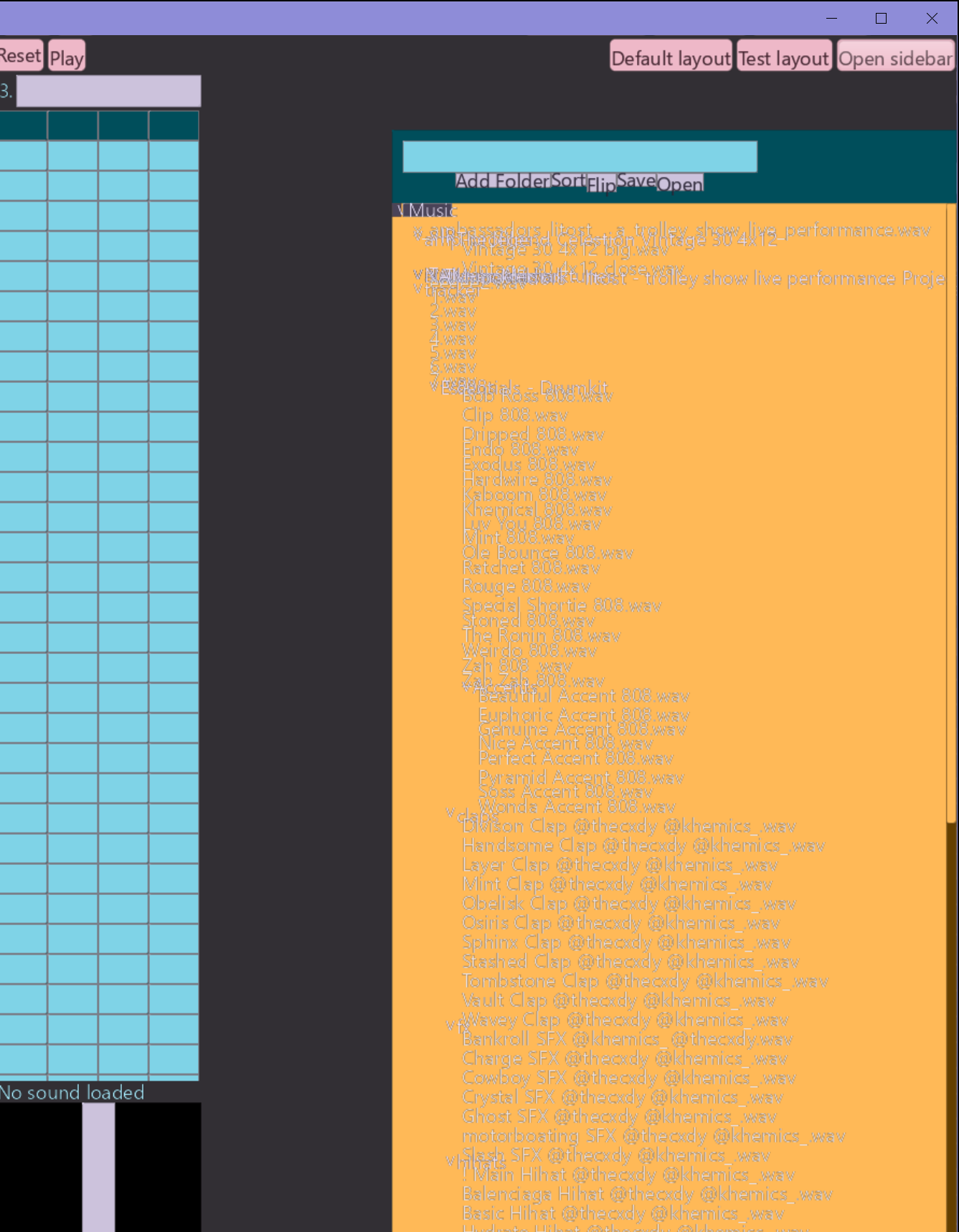
And only when the user perform some sort of input (keypress, mouse movement, etc) does it fully resolve to what it should look like:
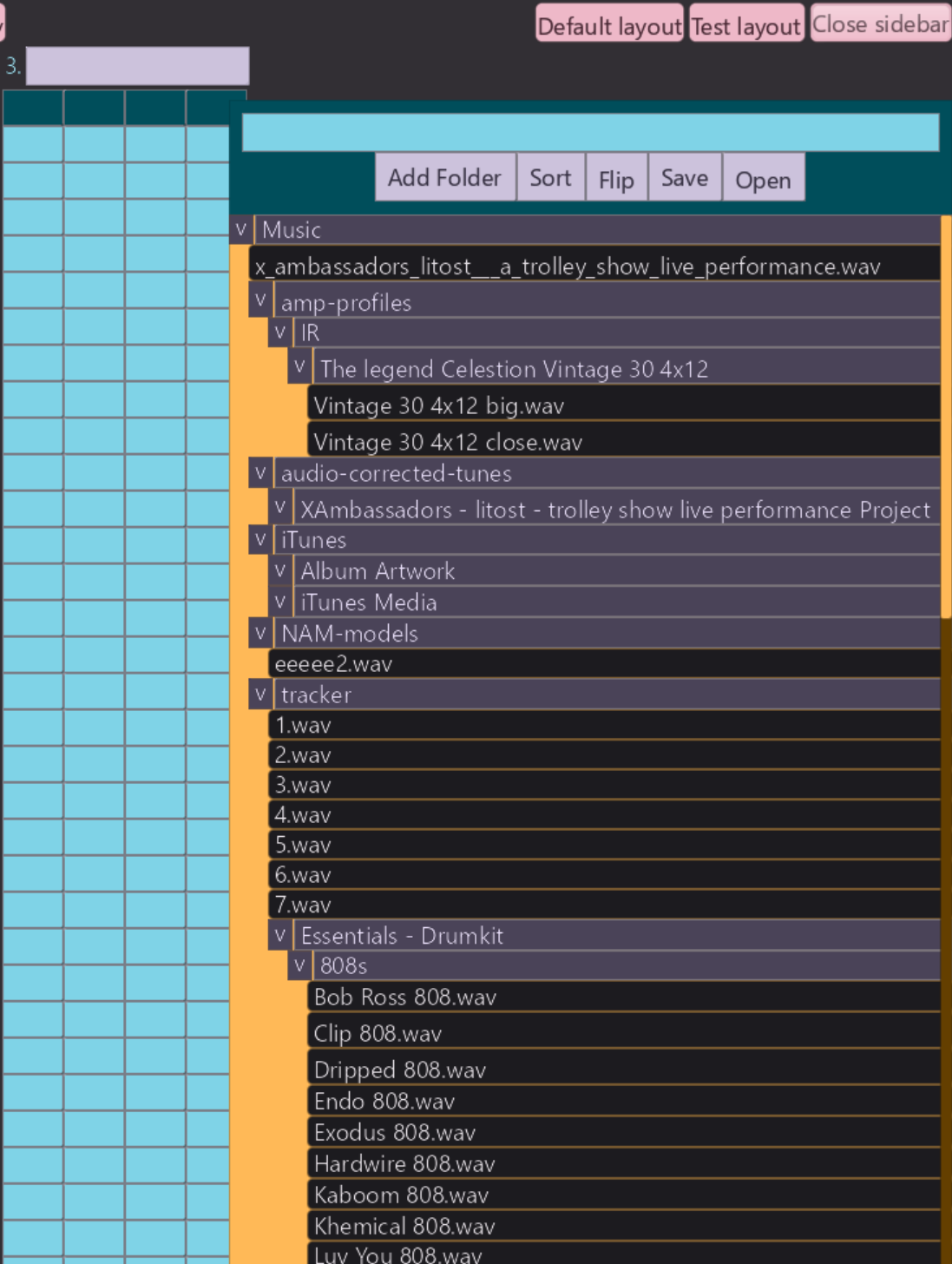
Essentially, on frame N, we press on the Open Sidebar button, that
sets app.browser_showing = true, but the UI can only react on frame N+1 to app.browser_showing. Frame N+1 is blocked at the call to sdl.WaitEvent() and will only unblock and react to the new state upon user input. Moving the mouse would unblock
and thus fully resolve and render the File_Browser, but relying on that is janky,
and fundamentally wrong.
[! NOTE FROM EDITOR: This isn't actually the reason why this visual bug happens, need to provide a valid explenation]
This is only 1 such example, it's a common pattern for my UI widgets to sometimes rely on the result of a previous frame to be fully computed, and thus only correctly render on the frame after the current one. Blocking at the start of that next frame, would leave those widgets not rendered properly.
There are 2 methods I can think of to solve this:
- Utilize SDL's
WaitEventTimeoutwhich will wait for events, but unblock if a timer you give it times out. You would pass it a time equal to the framerate at which you're running, which is probably the frame rate of the monitor. So something like 16.666ms for 60HZ and 8.333ms for 120HZ. This would resolve the problem, but significantly increase our idle CPU usage as we'd be waking up every 8.333ms in order to recompute an identical layout and render an identical UI. This would result in the exact same behaviour as this earlier pseudocode I showed:This is not an acceptable solution.for /* ever */ { start := time.now() should_quit := app_update() if should_quit do app_shutdown() end := time.now() time.accurate_sleep(end - start) } - A better solution is the following: keep the same waiting based application loop, but force the application to process a few more frames after waking up. For my UI 2-3 would probably be fine, but to avoid future frustration, I'll set it to 5 frames.
This can be achieved like so:
First we add an extra piece of state to our global UI_State:
UI_State :: struct {
	// ...
	// many fields
	// ...
	frames_since_sleep: int // init to 0.
}
It should be initialized to 0, which in Odin happens by default.
Then in app_update we have:
app_update :: proc() -> (all_good: bool) {
	if ui_state.frames_since_sleep >= 5 do ui_state.frames_since_sleep = 0

	// ...
	// unchanged
	// ...

	// Check if it's time to try and sleep again. Sleep until an event arrives and unblocks us. Only sleep
	if ui_state.frames_since_sleep == 0 && sdl.WaitEvent(&event)  {
		exit, show_context_menu = handle_input(event)
		if exit do return false
	}

	// Poll for any other events that have arrived.
	for sdl.PollEvent(&event) {
		exit, show_context_menu = handle_input(event)
		if exit do return false
	}

	// ...
	// unchanged
	// ...

	ui_state.frames_since_sleep += 1

	return true
}
In English:
- Increment
frames_since_sleepby 1 on every iteration of the program. - Every 5th frame reset it to 0.
- Only block on input if
frames_since_sleep== 0. i.e. every 5 frames.
With this change, widgets that take > 1 frame to fully resolve and render now render correctly; and the UI goes back to sleep after 5 frames. This doesn't increase our CPU usage above 0% when the app isn't receiving input, and has resolved the issue of pausing the rendering of widgets that take > 1 frame to fully render.
There is still however another glaring issue with this approach and that is: animations.
Animations / Asynchronous
Excessive animations harm the user experience, things should react as fast as possible, we don't want to wait for some superfluous animation to finish before we can continue with our work.
However, some subtle animations are essential for a good, instructive UX; fortunately
most of that can be achieved with the notion of a hot and active widget:
hot=> hovered with the mouse / selected via the keyboard.active=> being clicked on right now / selected via keyboard and Enter is pressed right now.
This allows for subtle and instant hover animations on all widgets (leveraging hot), and things like visually depressing a button when clicked (leveraging active).
And since these states transition in line with user input, the UI thread will block in the appropriate state always, for example: if you hover over a button and then stop inputting to the program, the UI thread will block and go to sleep with that button correctly showing as hovered.
But in some instances it is necessary for the application to have animations run for many frames independently of user input. A good example of a worthwhile multi frame animation is a code editor scrolling down a page if you 'jump to definition' on some symbol that's defined below your current point in the page, this animation must take a multiple frames in order to look smooth, but it will never trigger correctly if the UI thread blocks immediately after you issue that command via the mouse / keyboard. We'll class this as an internally triggered animation.
Another similar type of problem is if you've relied on polling some adjacent system in your application for some changing state, and pass that state as visual information to a widget, and as such achieve an animating widget by virtue of the application constantly updating and you constantly feeding new visual data to the widget. We'll class this as an externally triggered animation.
An example of this in my application is the visual indication of the current step in a pattern in my tracker,
it needs to update once per musical 'step', which at 120BPM and a step size of 1/32, the active step should change every 62.5ms. The way this was currently achieved is much like how I described above:
substep_config: Box_Config = {
	semantic_size    = {{.Percent, 0.25}, {.Percent, 1}},
	color 			 = .Primary,
	border 			 = 1,
}

for i in 0 ..< N_TRACK_STEPS {
	pitch_box := edit_text_box(
		substep_config,
		// ...
	)

	volume_box := edit_number_box(
		substep_config,
		//...
	)

	send1_box := edit_number_box(
		substep_config,
		//...
	)

	send2_box := edit_number_box(
		substep_config,
		//...
	)

	// Here is where we poll the audio subsystem every single frame.
	curr_step := audio_get_current_step()
	if curr_step == i { // Update color of current step.
		pitch_box.box.config.color  = .Primary_Container
		volume_box.box.config.color = .Primary_Container
		send1_box.box.config.color  = .Primary_Container
		send2_box.box.config.color  = .Primary_Container
	}
}
Each time we create a track step, we poll the audio system to tell us what the current step is, if it's equal to the step we're about to create we set it to a specific color. As such we've 'animated' a moving play head that will indicate which audio step just played.
This is one of the very nice things about the 'naïve' implementation of an immediate mode UI, you basically get animatable widgets for free, each frame you recompute some value and recreate the UI, the widget now displays according to the new value. Since we're no longer continuously running, we lose this property.
_If you were embedding an IMGUI into your existing constantly running frame based program, like a game, then you could still rely on this with good results and less complexity_
Of course with the changes we've made, when the UI goes to sleep waiting for input, the UI code stops running and updating, so the play head doesn't move along. When we do provide input to the system, the play head jumps ahead many steps since the audio system runs in a separate persistent thread and therefore the current step has jumped ahead many positions.
So how can we square these 2 things with each other ? On one hand it appears we need the UI code to be constantly running in order to achieve animation, on the other hand, we want to keep the power efficiency we've gained from moving to a waiting / sleep based system.
The idea I've come up with is twofold:
- We can hook into SDLs event system, by sending custom events that will wake up the main UI thread when you want it to do work. Like address that a new audio step has occured.
- We will couple this with an intelligent animation system that will leverage
EventWaitTimeoutinstead ofEventWait.
(1) Will be for regular animations that UI programmers would be used to, like animating the
color / position of some widget over time. Most notably, when you queue up this animation, you
are expecting the UI to wakeup an re-animate once per frame_time.
(2) Will be for cases like the above play-head example where we want to alter the color of the current track step each time the audio system reaches a new step. You could generalise this to something like: Cases where your UI needs to respond to behaviour that your UI doesn't determine, i.e. the behaviour of an audio subsystem, the result of network IO, file IO, etc, even the user input case basically falls into this category.
To implement (1), we will provide the user the ability to queue up some animation, and then
each frame, the animation subsystem will be able to influence the timeout parameter we pass to EventWaitTimeout. The animation system will need to be able
to determine if an animation is currently playing or finished; if an animation is currently
playing it sets the timeout parameter to wakeup the UI thread in 8.33ms (or
whatever your frame-time is), if an animation is finished / an animation was never queued, it
will not touch the timeout parameter, which would of been initialized to infinity at the start of each frame.
To implement (2), we will allow the relevant subsystem to place custom events on SDLs event queue, this will in turn cause the OS to wakeup our thread. Some amount of co-ordination will need to be done here, but this is more a choice to be made by the application developer. The goal for UI library here is to provide as few constraints as possible to handle this kind of situation. It will ultimately be more verbose than a polling based system, but it's the price we pay for pretty hefty efficiency gains. For things like file IO, you can always just block the UI thread until the result returns, this would simplify the programming model, at the cost of introducing (potentially not noticeable) missed frames.
I don't actually have a separate animation system built in my codebase right now, since I relied on the constantly running top level loop. I will implement a simple animation system heavily inspired by this article. Since that writeup is short and concise, I will only provide brief details here, if you want more info, read the linked article.
Animation API:
It's a pretty simple API consisting of three functions:
animation_start :: proc(id: string, initial_value: f64, time_to_complete: f64)- This is used to kick off an animation, with the way the API is currently designed, it should not be called continuously on UI update, otherwise it'll reset the animation. I might change this though.
animation_update_all :: proc(time_since_last_frame: f64)- This is to be called once per frame and will update all of the currently queued
animations that were added with
animation_start.
- This is to be called once per frame and will update all of the currently queued
animations that were added with
animation_get :: proc(id: string, target_value: f64)- This is what you use to get the current value of an animation you created, whilst it's animating. It's what you pass into widgets as visual information each frame in order to get them to render.
Here is an example of how you can use it to animate the position and size of a button:
offset_x := f32(animation_get("ani_x", 200))
offset_y := f32(animation_get("ani_y", 60))

btn := text_button(
	"animate me :)",
	{
		floating_type = .Absolute_Pixel,
		floating_offset = {offset_x, offset_y},
		semantic_size = {{.Fixed, offset_x}, {.Fixed, offset_y}},
		color = .Warning
	}
)
if btn.clicked {
	animation_start("ani_x", 20, 1)
	animation_start("ani_y", 6, 1)
}
With that, we get an animation like this:
Notice the log output in the terminal only runs when the button is animating / when we're the moving the mouse around, and stops when the button finishes animating.
The implementation of the animation system basically follows the above article with one key
addition: animation_update_all has the added responsibility for setting the
global event_wait_timeout value if it sees that there is at least 1 animation
that isn't finished:
animation_update_all :: proc(dt: f64) {
	for i := ui_state.animations_stored - 1; i >= 0; i -= 1 {
		animation := &ui_state.animations[i]
		animation.progress += dt / animation.time
		// If animation is finished, remove it from list.
		if animation.progress >= 1 {
			// Nifty trick to 'remove' completed animation_items.
			ui_state.animations_stored -= 1
			animation^ = ui_state.animations[ui_state.animations_stored]
		}
	}

	// You would determine at startup what your expected frame time is.
	if ui_state.animations_stored > 0 {
		ui_state.event_wait_timeout = EXPECTED_FRAME_TIME_MS
	}
}
event_wait_timeout is what we use to unblock after a certain amount of time if an animation is not finished.
We use this new event_wait_timeout in app_update() like so:
if ui_state.frames_since_sleep >= 5 do ui_state.frames_since_sleep = 0
// By default we assume no animations are queued, so we set the timeout a LONG time away
ui_state.event_wait_timeout = 1_000_000_000
dt_ms := (f64(time.now()._nsec) / 1_000_000) - ui_state.prev_frame_start_ms
dt_ms = min(dt_ms, 100)
ui_state.prev_frame_start_ms = f64(time.now()._nsec) / 1_000_000
// This call will update event_wait_timeout if any animations are still running.
animation_update_all(dt_ms / 1_000)

// ... <SNIPPED>

if ui_state.frames_since_sleep == 0 && sdl.WaitEventTimeout(&event, i32(ui_state.event_wait_timeout * 1_000))  {
	exit, show_context_menu = handle_input(event)
	if exit do return false
}
_All the divisions / multiplication by powers of 10 is because of inconsistent units used by various time APIs some provide nanoseconds only, other expect seconds as input, others expect milliseconds._
With that change in place the animation we created above will force the UI to continue to update only for as long as it's running, when the animation completes, the UI goes back to sleep.
Now all that's left to do is get the audio system to hook into SDLs event API. Here's the audio timing function which runs on it's own thread:
audio_thread_timing_proc :: proc() {
	beats_per_bar :: 4
	steps_per_bar :: 32
	steps_per_beat := steps_per_bar / beats_per_bar
	for {
		start := time.now()._nsec
		if sync.atomic_load(&app.audio.exit_timing_thread) do return

		playing := sync.atomic_load(&app.audio.playing)
		if playing {
			curr_time_pcm := ma.engine_get_time_in_pcm_frames(app.audio.engine)
			step_time_pcm := (SAMPLE_RATE / N_TRACK_STEPS)

			// Assumes 1/32 steps.
			samples_per_step := SAMPLE_RATE * 60 / f64(app.audio.bpm) / f64(steps_per_beat)

			// The only way to get sample accurate playback with the high level engine in miniaudio
			// is to schedule a future time for a sound to start playing.
			horizon_samples := SAMPLE_RATE * AUDIO_SCHEDULING_HORIZON_MS / 1000

			last_playback_start_time := sync.atomic_load(&app.audio.last_playback_start_time_pcm)
			last_scheduled_step := sync.atomic_load(&app.audio.last_scheduled_step)

			// Calculate which step we're currently on and how far ahead to schedule.
			elapsed_pcm  := curr_time_pcm - last_playback_start_time
			current_step := int(f64(elapsed_pcm) / samples_per_step)
			horizon_step := int((elapsed_pcm + u64(horizon_samples)) / u64(samples_per_step))

			// Schedule next steps to be played.
			for step := last_scheduled_step + 1; step <= horizon_step; step += 1 {
				step_start_time_pcm := last_playback_start_time + u64(f64(step) * samples_per_step)

				for &track, track_num in app.audio.tracks {
					step_in_pattern := u32(step) % track.n_steps

					if track.armed && track.selected_steps[step_in_pattern] {
						track_step_schedule(u32(track_num), step_in_pattern, step_start_time_pcm)
					}
				}
				sync.atomic_store(&app.audio.last_scheduled_step, step)
			}
		}
		end := time.now()._nsec
		elapsed_ms := f64(end - start) / 1_000_000
		// Sleep to conserve energy.
		time.accurate_sleep((time.Millisecond * AUDIO_SCHEDULING_HORIZON_MS) - time.Duration(int(elapsed_ms)))
	}
}
_Many details of this function are irrelevant for this function; the most important part is
where we calculate the current_step_
In English that function (these details aren't relevant to this post really, but it's just for anyone who is interested, you can skip if not):
- Runs in it's own thread (it's scheduled to run at a high priority at the start of the main
thread), looping continuously and sleeping every
AUDIO_SCHEDULING_HORIZING_MSwhich is set to 10ms - It figures out the current step based on the
miniaudio's engine clock, the sample rate, BPM, etc and based on how long it's set to sleep for. It does similar calculations to figure out thehorizon_stepwhich is the further away step it will schedule.miniaudiowhich is what I use for cross platform audio, only facilitates sample accurate playback if you set a PCM time for a sound to start, that's in the future.- Right now it's set to wakeup every 10ms, which is actually much faster than it needs to as each step is > 50ms apart. However, the higher the sleep time, the longer it takes for the audio thread to basically 'react' to changes in the audio state which were made from the main UI thread.
- Once it's scheduled all the relevant future steps, it goes to sleep.
As you can see, we already work out the current step in this thread, so instead of having the
UI thread polling the audio system every frame, we can instead only do this when the
audio thread 'wakes up' the UI thread. You could most likely also emplace current_step, or whatever relevant data your UI needs, onto the event queue via a
custom event; this would be especially worth it if it's costly to re-compute the data your UI
needs, but in our case, it's fine just to call audio_get_current_step() again, it
lets us keep our existing code path for drawing the current step and it also avoids further
complicating our already complex handle_event() function.
To make this work we would add this to audio_thread_timing_proc:
audio_thread_timing_proc :: proc() {
	// ...
	// unchanged.
	// ...
	elapsed_pcm  := curr_time_pcm - last_playback_start_time
	current_step := int(f64(elapsed_pcm) / samples_per_step)

	wrapped_step := current_step % N_TRACK_STEPS
	last_ui_step := sync.atomic_load(&app.audio.last_ui_notified_step)
	if wrapped_step != last_ui_step {
		sync.atomic_store(&app.audio.last_ui_notified_step, wrapped_step)
		event: sdl.Event
		event.type = .USEREVENT
		sdl.PushEvent(&event)
	}
	horizon_step := int((elapsed_pcm + u64(horizon_samples)) / u64(samples_per_step))
}
This will push an sdl.Event onto the queue, which is exactly the thing we sleep
on in app_update(), I'm not sure of the internals, but in short, the OS will wake
up our UI thread since we slept waiting for events.
With those changes, we've successfully re-architected our UI into an efficient waiting based system that sleeps when there's no work to do, whilst maintaining the cleanliness of an immediate mode GUI API.
Nice.
However we still have another problem that is better solved in retained mode GUIs. When there is work to do, we are doing a lot of redundant work. For example if the UI is only running in order to animate a single widget, that's 1 rect out of say 900 that actually needs to update and re-render.
Unfortunately this article is already getting too long, so we will leave that for part 2.
LJK.